
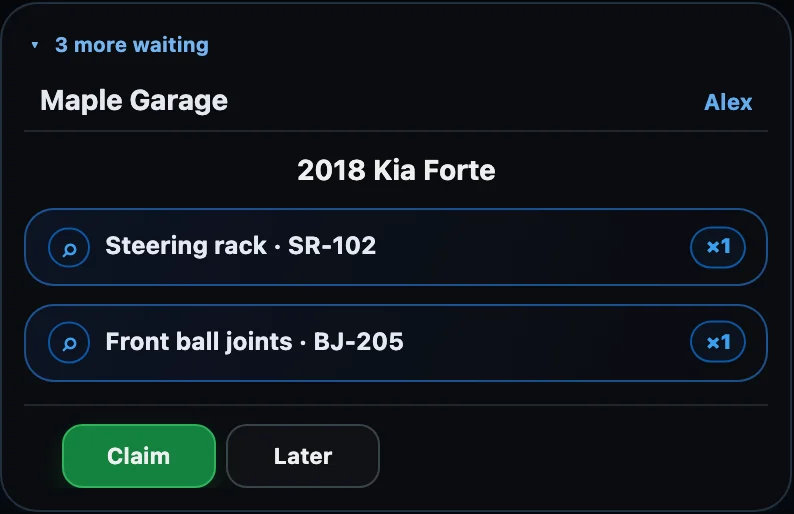
Instant Alerts
A small always-on-top window appears at the bottom right of your screen the moment a garage sends a request, follows up, or picks your quote. It pulses, then settles, and stays until the request is opened — or a colleague takes it.
NorthGarage AI · For auto-parts suppliers
Receive part requests from garages, reply with price and availability, and keep every order conversation in one place.
Windows 10/11, 64-bit. Free.
Garages on NorthGarage send part requests straight to your desk. You answer with price and availability, they pick, and the whole conversation stays attached to the order — no phone tag, no lost texts, no retyping.
01
Garages in your delivery area send part requests from NorthGarage, in their own language.
02
Price, availability and a screenshot from your catalogue go back in one reply.
03
Quotes, the garage's choice and every message stay together with the request.
A garage that can't reach you calls the next supplier. Requests get lost when the phone rings while everyone is busy, when the mechanic and the counter don't share a language, and when the quote comes back after the garage has already ordered elsewhere. Supplier Desk catches all three.
38→6
Lost requests per 100
+32
More orders you get a chance to win, per 100 requests
Illustrative estimate for a parts counter receiving about 100 garage requests a week — not measured data. Results depend on your team, your stock and your garages.
A small always-on-top window appears at the bottom right of your screen the moment a garage sends a request, follows up, or picks your quote. It pulses, then settles, and stays until the request is opened — or a colleague takes it.

Price each part as Regular or Premium, pick Today, Tomorrow or a date, and send. Not in stock? One tap on NA. The vehicle's VIN, trim and engine are right there, so you quote the right part the first time.

Type your price once and see the total and the total with tax side by side. The shop receives your net price and your tax rate — no double HST, no guessing.

Garages speak whatever language they work in. You read every request in the language you chose, and your reply reaches them in theirs.

Requests are grouped by garage and split into Active and History. When a colleague claims a request, everyone else's alert clears instantly — no two people quoting the same job.
Supplier Desk is a quiet Windows app for the people behind the counter. It sits in the tray, wakes up when a garage needs a part, and puts the request, your price and the conversation on one screen — then gets out of the way.
01
Garages on NorthGarage send part requests straight to your desk — no phone tag, no missed texts.
02
You see the request and the garage. Not competing suppliers, not the garage's customers, not their finances.
03
Starts with Windows into the tray, keeps you signed in, and gets out of the way until a request lands.
04
Supplier Desk is free to install and use. Sign in with the email your organization owner added.

Install Supplier Desk on the computer at your parts counter and start answering garages today.
Windows 10/11, 64-bit. Free.
Before you install
Windows may show “Windows protected your PC” because the installer is new. Click More info, then Run anyway. Sign in with the email your organization owner added.